IPTV Setup Guide
Set up your IPTV service in under 5 minutes. Select your device for step-by-step instructions.
Select your device
Amazon Firestick
Fire TV Stick, Fire TV Cube, Fire TV
Recommended App
IPTV Smarters Pro
Install Downloader App
You now need to install the Downloader app which is available directly in the Amazon App Store on your Fire TV. To do this, go to the App Store and search for 'Downloader'. Once you find the app, download it.
Step 1
From the Fire TV home screen, select the search icon
Step 2
Type 'Downloader' in the search bar
Step 3
Select the Downloader app from the results
Step 4
Click 'Download' or 'Get' to install the app
Note: Downloader is a free app that allows you to easily download files to your Fire TV Stick.
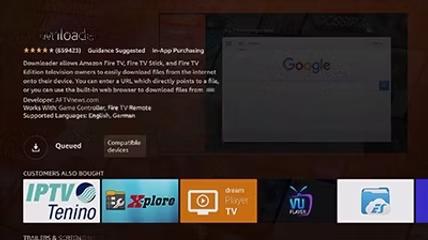
Install IPTV Smarters Pro
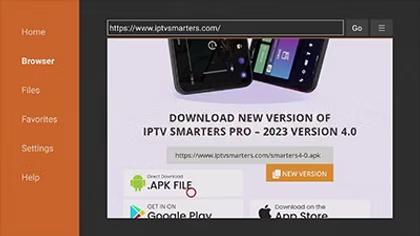
You must now install IPTV Smarters Pro. Enter the following code in the Downloader app: 164547. Then scroll down to IPTV SMARTERS and click DOWNLOAD. The IPTV SMARTERS download will start, then you need to open the application and click 'Install'.
Step 1
Open the Downloader app you just installed
Step 2
In the URL field, enter: 164547
Step 3
Scroll down and select 'IPTV SMARTERS'
Step 4
Click 'DOWNLOAD' and wait for the file to download
Step 5
Once downloaded, click 'Install' to install the app
Note: The installation may take a few moments. Make sure not to interrupt the process.
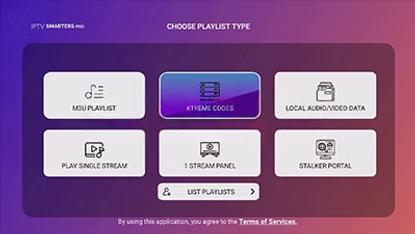
Launch IPTV Smarters Pro
Once you have downloaded IPTV Smarters Pro, you must follow the installation instructions. When the IPTV Smarters Pro app is launched, please follow these steps:
Step 1
Choose 'TV' in 'DEVICE OPTION'
Step 2
Accept the Terms of Use of the IPTV Smarters Pro app
Step 3
Choose 'XTREME CODES' as the login method
Note: Make sure to select the correct device option for the best viewing experience on your Fire TV.
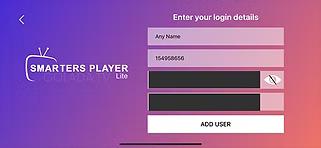
Enter Your Login Credentials
Fill in the fields with your information received when you paid for your IPTV subscription.
Playlist Name
For the first field, you can enter any name you want to identify your playlist
Username
Enter your Username in the Username field
Password
Enter your Password in the Password field
URL
Enter the server URL in the URL field
Note: Check your information carefully and press 'ADD PLAYLIST'. You're now ready to enjoy your IPTV service on your Amazon Fire TV Stick.